max-ultra-mcp-community-skills
Updates: self-update and Settings > Updates
How a tool made with this skill gets new versions, and what to do when the owner says “the tool needs updates”.
Code: updates template (updater.py, tools/release.py), the launcher’s bootstrap.py
(launcher-bootstrap), Controller.check_updates, the Settings group
(dialogs) and ToolWindow.on_update_result (tool window). The
model is MaxPkg Packager 2.0’s (verified download, one-step switch, rollback); MaxPkg Runtime Manager uses the same
rules with an immediate restart.
Two ways a tool is updated
- Through MaxPkg (always): the tool is delivered as an MZP; publishing a new version on maxpkg.dev lets MaxPkg update the installed package (the copy next to the launcher). Nothing in the tool is needed for that.
- Self-update (optional, when the owner wants updates between MaxPkg releases or a check from inside the tool):
the tool reads an
update.jsonthat the owner publishes, downloads the new version into the user profile (%LOCALAPPDATA%\MyTool\app\v<version>) and starts it at the next launch. The launcher always starts the newest copy: the installed update, or the copy next to the launcher when MaxPkg has put a newer one there since.
Turn self-update on by setting UPDATE_URL in python/mytool/__init__.py. With UPDATE_URL = "" there are no checks,
no network access and no Updates group in Settings.
What the user sees
- Settings > General > Updates (only with an
UPDATE_URL): a switch “Check for updates automatically and install them in the background” (on by default) and Check Now with a line that says the result: “You have the latest version (1.2.0).”, “Version 1.3.0 is installed. It starts when MyTool opens again.”, or why the check failed. - Automatic check: 2 s after a normal start (not in safe mode), in a background job; failures stay quiet (only the log has them).
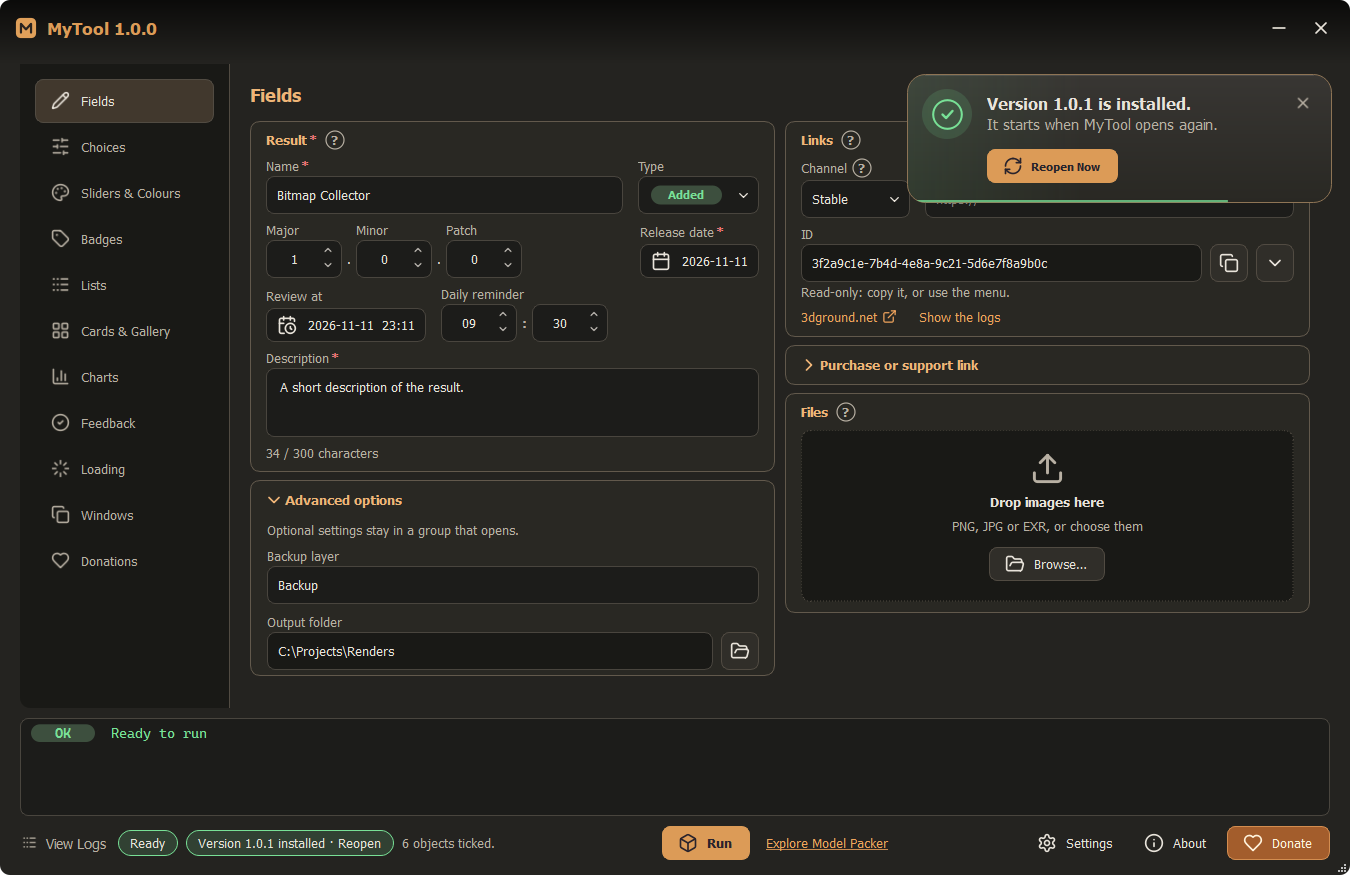
- When a new version is installed: a success toast “Version 1.3.0 is installed. / It starts when MyTool opens again.” with Reopen Now, and a pill in the status bar “Version 1.3.0 installed · Reopen”; a click reopens the tool through its launcher (asking first while work runs). The running session is never changed.
How it stays safe
update.jsonis read with a cache-busting query; offline or “not published yet” (404) is an expected outcome.- Only a newer version (
MAJOR.MINOR.PATCHcompared as numbers) is downloaded, to a.partfile, withcurl.exeas a fallback when Python cannot connect. - The archive must match the SHA-256 in
update.json; it is unpacked into a staging folder with a path check (nothing outside the folder), itsbootstrap.pyand package must exist, the package version must equal the manifest’s, and every.pyfile must compile (a syntax check; nothing is imported or run). - Only then the staging folder is renamed to
v<version>andcurrent.jsonis replaced in one atomic step. The previous version stays (two versions are kept); older ones are pruned. - The launcher’s
bootstrap.pystarts the newest copy. If a freshly installed version fails to start, it rolls back once: to the previous installed version, or (with none) to the copy next to the launcher, and says so in the Listener.bootstrap.pyitself is not updated by a self-update: keep it compatible with newer packages.
Never replace a published archive of a version with different bytes; publish a new version. Never update the running session in place, never install without a checksum, never ask the user to delete folders by hand.
When the owner asks for updates
- Decide with the owner: MaxPkg only (publish a new version on maxpkg.dev), or self-update as well. For self-update
choose where
update.jsonand the archives are published (the raw files of the repository’s main branch, for examplehttps://raw.githubusercontent.com/<owner>/<repo>/main/release/, or a release’s assets). Do not invent an address; ask for it. - Set
UPDATE_URL = "<base>update.json"and raise__version__. Keep the MaxPkg package version the same number. - Run
python tools/release.py --base-url <base> --note "+ Added: ..."(or writerelease/notes.txt). It writesrelease/mytool-app-<version>.zip(python/ and assets/, fixed timestamps) andrelease/update.json. - Publish the archive first and
update.jsonlast (an installed copy that reads the manifest must find its archive). Publishing, committing and pushing need the owner’s explicit go-ahead. - Check an installed copy: Settings > Updates > Check Now shows the new version installed; Reopen starts it; Logs show “Update 1.3.0 installed” and “Starting MyTool 1.3.0”.
Tests (inside 3ds Max, no network)
Build two releases with the tool’s own tools/release.py into a scratch folder with a file:/// base URL, point
UPDATE_URL at it in the test and redirect the user data folder. Check: check_updates installs 1.0.1 and
current.json names the verified copy; the pill and the toast appear; bootstrap.pick_root starts the installed copy
when it is newer and the copy next to the launcher otherwise; a second update keeps the first as previous;
bootstrap._roll_back goes back to the previous version, and with none to the copy next to the launcher; a wrong
checksum installs nothing; Settings shows Updates only with an UPDATE_URL. Load bootstrap.py’s functions without
its last line (the call that starts the tool). Real network, a real publication and a real failed start stay separate,
explicitly reported tests.