max-ultra-mcp-community-skills
The tool without its window: the API
Every tool made with this skill has an API by default: the same operations its window offers, callable from MAXScript, from Python and by AI assistants through Max Ultra MCP, with no window open. Build it with the tool, not afterwards: the window is one caller of the API, scripts and assistants are others.
The parts
| File | What it does |
|---|---|
python/mytool/max_api.py |
The scene work, on Max’s main thread only; pymxs lives here and nowhere else. Plain values in, plain data out (handles, names, counts); a change takes dry_run and runs in one undo record. |
python/mytool/api.py |
The public operations: a table of name, function, summary, changes_scene, parameters (type, required, default, choices, limits, pattern, text) and an example; describe, call, call_json, call_from_maxscript. |
python/api_entry.py |
Loads the package without the window: the same copy the window starts (bootstrap.pick_root), or the window’s own modules when it is open. Imports bootstrap.py with _MYTOOL_IMPORT_ONLY so it does not start a window. |
MyToolAPI.ms |
Defines the MAXScript global MyToolAPI with call operation params:"{...}". StartMyTool.ms runs it first; a startup script may run it alone so the API is there from Max’s start. Nothing loads until the first call. |
The starter’s operations are examples to replace: describe, scene_summary (read-only), add_prefix (changes
names, with dry_run), get_settings and set_setting (the settings an assistant may touch, listed in
PUBLIC_SETTINGS; a theme change shows at once in an open window).
Rules
- One code path. The window’s buttons call the same functions (
api.callormax_apidirectly); never a second copy of the logic for the API. A fix reaches both. - An envelope, never an exception.
{"ok": true, "operation": ..., "result": ..., "warnings": [...]}or{"ok": false, "operation": ..., "error": {"code": ..., "message": ...}}. Codes:UNKNOWN_OPERATION,INVALID_PARAMS,INVALID_JSON,NOT_IN_MAX,FAILED. The message says what to do (“prefix is required (letters, digits, - and _)”); the log keeps the traceback. - Described.
describereturns the tool, its version,API_VERSIONand every operation with its parameters and an example, so an assistant reads it first and calls only what it lists. Write eachsummaryand parametertextfor a reader who has not seen the window. - Checked at the boundary. Types, required parameters, choices, limits and patterns are checked before the function runs; an unknown parameter is refused, never ignored. MAXScript literals are never built from raw text.
- Safe changes. A call that changes the scene says so (
changes_scene), takesdry_run(try it first), runs inside one undo record (pymxs.undo(True, "...")), and returns what it changed: handles, old and new names, counts. It works on NodeRefs by handle, never by name alone. - No interface. No dialogs, prompts, message boxes or file pickers in an API call; a missing answer is an
INVALID_PARAMSerror. Paths come as parameters. - Main thread. Scene work runs on the main thread (MAXScript, Max Ultra MCP’s
max_executeand the window all call it there). A long operation runs as a job in the window; through the API it returns a short result, or is split into steps the caller repeats. - Stable.
API_VERSIONgrows only when an existing call changes meaning; adding an operation does not change it. Keep old names working. - Logged. Each call writes one line to the tool’s log (
mytool.api: operation and result code).
Calling it
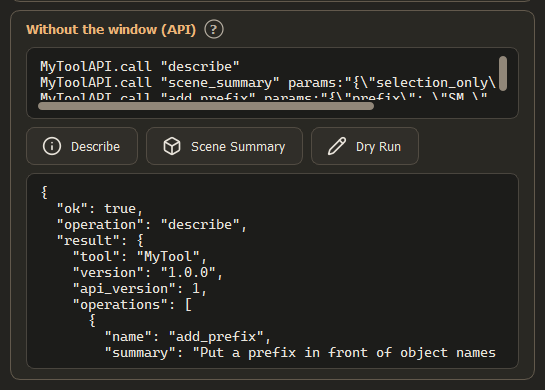
MyToolAPI.call "describe"
MyToolAPI.call "scene_summary" params:"{\"selection_only\": true}"
MyToolAPI.call "add_prefix" params:"{\"prefix\": \"SM_\", \"dry_run\": true}"
from mytool import api
api.call("add_prefix", prefix="SM_", dry_run=True)
An assistant with Max Ultra MCP runs the MAXScript lines through max_execute (or the Python through
python.Execute), reads the JSON, and shows the user what a dry_run would change before it runs the real call.
In the trainer
The Windows section’s panel “Without the window (API)” shows the calls and three buttons (Describe, Scene Summary, a dry run of Add Prefix) that call the same API and print its JSON answer.
Checks
The trainer’s checks call describe, refuse an unknown operation, a missing parameter, an unknown parameter and a
wrong value, read the scene, try add_prefix only with dry_run, read JSON in and out, call MyToolAPI.call
through MAXScript (and put the owner’s MyToolAPI back), load api_entry.py without a new window session, and
press the panel’s button. They never change settings or the scene through the API.
MaxPkg: MyToolAPI.ms, python/api_entry.py, python/mytool/api.py and python/mytool/max_api.py are runtime
files; add them to the packager’s explicit file list (MaxPkg delivery).